
WageLens: AI-Powered Wage Compliance for Workforce Management
Most compliance tools tell you what you’re doing wrong. WageLens also tells you what you’re doing unnecessarily — and what it’s costing you. Upload your Workforce Management configuration and WageLens scans every Pay Rule against the actual wage laws for each employee’s work state, surfacing both violations and over-compliance in seconds.
Whether you’re running UKG/Kronos, ADP, or another WFM platform, WageLens eliminates the manual audit work, quantifies your legal exposure in dollars, and identifies where you’re providing wage benefits — meal breaks, rest breaks, overtime, double time, minimum wage compliance, and more — that state law doesn’t require you to offer, or in some cases doesn’t require at the level you’re currently providing.
What is the WageLens Compliance Agent?
WageLens is an AI-powered compliance agent built specifically for HR and payroll teams who manage multi-state workforces through Workforce Management systems. Instead of reviewing Pay Rules manually — or waiting for a lawsuit to discover a problem — WageLens ingests your WFM configuration and automatically cross-references every Pay Rule against the wage and hour laws of the state where those employees actually work.
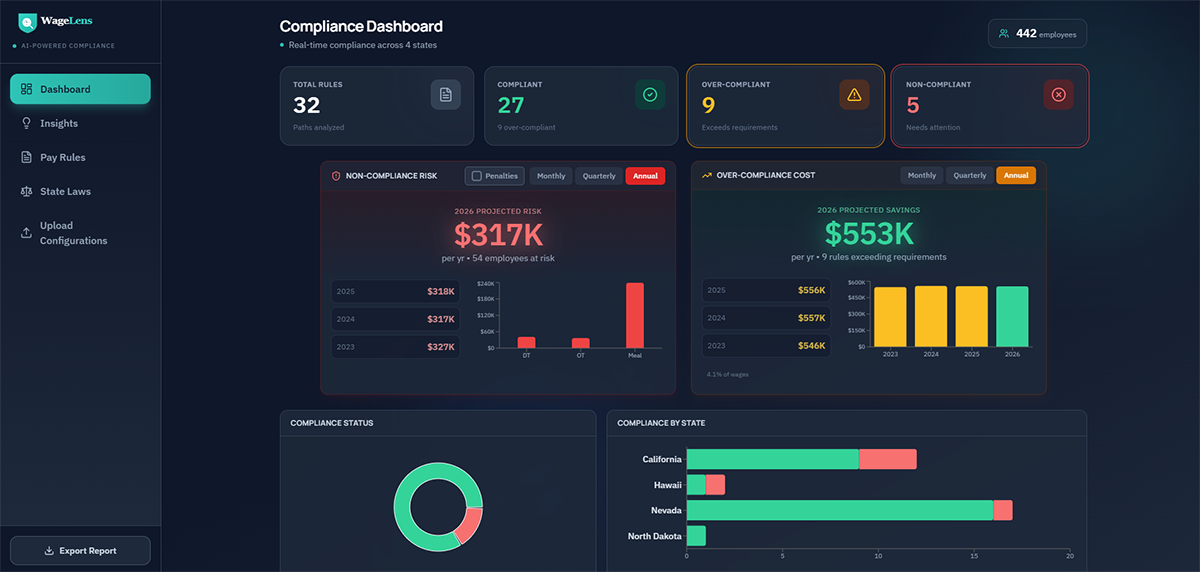
The result is a real-time Compliance Dashboard that shows you, in plain dollar terms, exactly how much legal exposure you’re carrying from non-compliant rules, and exactly how much you’re overspending on wage benefits you’re not legally required to provide.
WageLens analyzes compliance across a broad range of wage and hour requirements — including meal breaks, rest breaks, overtime, double time, and minimum wage — among others. For every Pay Rule, it determines what the applicable state requires, compares it to what your configuration actually does, and flags the gap — in both directions. For every Pay Rule, it determines what the applicable state requires, compares it to what your configuration actually does, and flags the gap — in both directions.


The Numbers Speak for Themselves
Multi-state employers using WageLens consistently discover that their WFM configurations are generating significant financial exposure in both directions simultaneously — often without anyone in HR, payroll, or finance being aware. For a typical 500-person organization operating across multiple states, a single WageLens scan routinely surfaces:
$750K–$1M+ Combined configuration risk and overpayment identified across non-compliant and over-compliant Pay Rules
Both directions Legal liability from under-configured rules AND unnecessary payroll cost from over-configured rules — often surfaced in the same scan
Years of exposure Violations that have been accumulating undetected, with open statute-of-limitations windows that extend liability backward
Minutes to find it WageLens surfaces all of it in the time it takes to upload a configuration file — no manual audit, no legal engagement, no waiting
The gap between what organizations think their WFM configuration is doing and what it is actually doing — measured in dollars — is almost always larger than expected. WageLens makes that gap visible for the first time.
The Numbers Speak for Themselves
Non-Compliance: Your Legal Exposure
Non-compliant Pay Rules are configurations that fail to meet the wage requirements of the employee’s work state. These create real legal liability — back wages owed, civil penalties per violation, and multi-year statutes of limitations that mean past violations can still come back. WageLens calculates your potential exposure using the actual damages formula for each violation type:
- Meal Break violations: Hourly Rate × Meal Break Hours = Back Wages (plus applicable civil penalties per violation)
- Overtime violations: 5× premium on qualifying hours not properly compensated
- Double Time violations: Premium wages owed for hours beyond state daily double-time thresholds
- Rest Break violations: One hour of premium pay per workday the required break was not provided
- Minimum Wage violations: Back wages for any shortfall between what the Pay Rule pays and the applicable state or local minimum wage, including where state minimum wage exceeds the federal floor
Non-Compliance: Your Legal Exposure
Over-Compliance: Your Hidden Payroll Cost
Over-compliant Pay Rules are configurations that provide wage benefits — paid rest breaks, meal break premiums, overtime thresholds, double-time triggers — that the employee’s work state does not legally require. This is one of the most common and least-detected sources of unnecessary labor cost in multi-state organizations.
It happens when a single Pay Rule is copied across states without adjustment, or when a company applies its strictest state’s standards (often California) to employees in states with fewer requirements. Over-compliance isn’t a compliance risk — it’s a cost optimization opportunity. WageLens quantifies exactly how much you’re overspending per rule, per year, so you can make an informed decision about whether to adjust.
The WageLens Compliance Dashboard
The moment you upload your WFM configuration, WageLens generates a real-time Compliance Dashboard that gives you an immediate read on your entire Pay Rule landscape across all states. Every metric is live, dollar-denominated, and drillable.
At-a-Glance Summary
- Total Rules Analyzed: The total number of Pay Rule paths scanned across your configuration
- Compliant: Pay Rules that meet — but do not exceed — state requirements
- Over-Compliant: Pay Rules providing benefits beyond what state law requires, with projected annual savings if adjusted
- Non-Compliant: Pay Rules that need attention, with projected legal exposure if not addressed
Non-Compliance Risk Panel
Shows your projected annual exposure from non-compliant rules, broken down by violation type (Double Time, Overtime, Meal Break) and by prior years so you can see the trend. Toggle between Penalties included and back wages only. View by month, quarter, or annual.
Over-Compliance Cost Panel
Shows your projected annual savings available if over-compliant rules are adjusted. Displays year-over-year trend so you can see how the over-compliance cost has grown. Shows the percentage of total wages the overpayment represents.
Compliance by State
A horizontal bar chart breaking down compliant vs. non-compliant rules across each state in your configuration. Instantly see which states carry the most risk or the most over-compliance opportunity.
Compliance Insights: Rule-by-Rule Breakdown
The Insights view gives you a ranked, side-by-side breakdown of every problematic Pay Rule — prioritized by dollar impact so you know exactly where to focus first.
Damage Risk (Non-Compliant Rules)
Every non-compliant Pay Rule is listed with its violation type (Meal Break, Overtime, Double Time, Rest Break), the state it applies to, the number of employees affected, and the annual dollar exposure. Click any rule to open its Damages Detail view.
Overpayment (Over-Compliant Rules)
Every over-compliant Pay Rule is listed with the benefit type being over-provided, the state, the number of affected employees, and the annual overpayment amount. Ranked from highest to lowest so you can prioritize the largest savings opportunities.
Damages Detail: Full Drill-Down on Every Violation
Click any non-compliant Pay Rule and WageLens opens a complete Damages Detail view that gives you everything you need to understand the violation, calculate your exposure, and make a remediation decision.
Damages Formula
Shows the exact calculation being applied — Hourly Rate × multiplier × impacted hours = Back Wages — with the total number of violations and civil penalty amount clearly displayed. No black boxes. You can see exactly how every dollar of exposure was derived.
State Statute Details
Displays the applicable statute of limitations, links directly to the legal reference, and explains in plain language exactly why the Pay Rule is non-compliant and which specific WFM configuration element is missing or incorrect.
Current-Year and Projected Exposure
Shows both the current-year potential exposure and the projected forward exposure if the issue is not addressed — including total damages, maximum monthly exposure, total impacted hours, and number of affected employees.
Employee-Level Damages Breakdown
A full table showing every affected employee with their ID, state, hourly rate, impacted hours, back wages owed, and total maximum exposure. Toggle between 2025 and 2026, and between monthly, quarterly, and annual views. Exportable for payroll remediation planning.

Built-In State Law Reference Library
WageLens maintains a comprehensive, up-to-date state wage law library covering every state in your configuration. You never have to cross-reference an external source — everything you need to understand a violation or validate a rule is built in.
For each state, the library covers:
- Daily Overtime rules: When 1.5× and 2× triggers apply based on hours worked in a single workday
- Weekly Overtime rules: When the 40-hour threshold triggers and at what rate
- Meal Break requirements: Mandatory break timing, length, paid vs. unpaid, waiver conditions, and second-break thresholds
- Rest Break requirements: Frequency, duration, and paid status of required rest periods based on hours worked
- Violation Penalties and Statutes: Back wage multipliers, liquidated damages, civil penalty ranges per violation, and statute of limitations for each violation type
- Full Legal Citations: Exact statute references (e.g., CA Labor Code § 510; NRS 608.019) with plain-language summaries and full legal text available on demand
State Spotlight: Where the Stakes Are Highest
Not all states are equal when it comes to wage law penalties. Certain states combine strict requirements, steep per-violation penalties, and long statutes of limitations — a combination that turns a misconfigured Pay Rule into a compounding liability. If you operate in any of the following states, your WFM configuration deserves immediate scrutiny.
The Highest-Stakes State for WFM Compliance
California has the strictest wage and hour laws in the country — and the penalties multiply fast. Employers owe one additional hour of premium pay per missed meal break per employee per day, and another hour for each missed rest break. Miss both in a single day and you owe two hours of premium pay per employee. With a three-year statute of limitations, a single misconfigured Pay Rule covering 50 California employees can silently accumulate hundreds of thousands in back-wage liability before anyone notices.
California also has daily overtime (after 8 hours, not just 40 hours weekly) and double-time triggers (after 12 hours in a day, or on a 7th consecutive workday). A Pay Rule built for a federal-standard state will be non-compliant in California across multiple dimensions simultaneously. And because California’s Private Attorneys General Act (PAGA) allows employees to sue on behalf of the state for wage violations — with penalties distributed to all aggrieved employees — a class action risk sits on top of every uncorrected configuration gap.
Key numbers: 1 hour premium pay per missed meal break • 1 hour premium pay per missed rest break • Civil penalties $100–$4,000 per violation • 3-year statute of limitations • PAGA class action exposure • Daily overtime threshold: 8 hrs • Double-time threshold: 12 hrs
Washington — $5,000 Per Violation, No Cap for Repeat Offenders
Washington imposes civil penalties of up to $5,000 per meal or rest break violation — one of the highest per-violation penalties in the country. For healthcare employers, penalties escalate to $5,000–$20,000 per violation and double after three consecutive quarters of non-compliance. Willful violations carry a minimum $1,000 civil penalty or 10% of total unpaid wages, whichever is greater, up to a $20,000 maximum per violation.
Washington requires a 30-minute meal break for any shift over five hours, a 10-minute paid rest break for every four hours worked, and an additional meal break for shifts exceeding 11 hours. A Pay Rule that treats Washington like a federal-standard state will generate violations across meal breaks, rest breaks, and potentially overtime — each one carrying five-figure civil penalty exposure.
Key numbers: Up to $5,000 civil penalty per violation • Healthcare: $5,000–$20,000 per violation • Willful violations: min. $1,000 or 10% of unpaid wages • 3-year statute of limitations • 10-min paid rest break every 4 hours
Oregon — Six-Year Statute of Limitations + Liquidated Damages
Oregon is notable for having one of the longest statutes of limitations for wage claims in the country: six years. That means a misconfigured Pay Rule that’s been running since 2019 could still carry full back-wage exposure today. Oregon courts also award liquidated damages equal to 100% of the unpaid wages — doubling the effective liability on top of back wages already owed. A November 2025 court ruling further established that any meal break shorter than 30 minutes triggers a full 30-minute penalty payment, regardless of how short the actual shortfall was.
Oregon requires a 30-minute meal break for shifts of six or more hours and a 10-minute paid rest break per four hours worked. The Bureau of Labor and Industries can assess civil penalties of up to $1,000 per violation, plus attorney fees and litigation costs if a lawsuit is filed.
Key numbers: 6-year statute of limitations (general wage claims) • 100% liquidated damages on unpaid wages • Up to $1,000 civil penalty per violation • Any short meal break = full 30-min penalty • Waiting time penalties for termination without full pay
Illinois — Penalties Per Offense, Per Day, Per Employee
Illinois imposes break violation penalties of $500 per offense for employers with 25 or more employees ($250 for smaller employers) — and critically, each day that an employee works without a required meal break is treated as a separate offense. For a 100-person Illinois employer with a misconfigured Pay Rule running for a year, that adds up to potentially $18 million in theoretical maximum penalty exposure before back wages are even calculated. An additional 2% penalty per month is assessed on any unpaid wages throughout the period of underpayment.
Illinois requires a 20-minute meal break for shifts of 7.5 or more continuous hours, provided within the first 5 hours of the shift. A 2025 amendment now also requires an additional 20-minute break for any employee working more than 12 hours total. Illinois does not mandate rest breaks for adults, but if short breaks (under 20 minutes) are offered, they must be paid and counted as work time.
Key numbers: $500 per offense per day per employee (25+ employee firms) • 2% monthly penalty on unpaid wages • 3-year statute of limitations • Second meal break required at 12+ hour shifts (2025 amendment)
Nevada — Two-Year Window, Civil Penalties Per Violation
Nevada requires a 30-minute meal break for any shift of eight or more continuous hours (NRS 608.019), to be provided no later than after the first five hours of work. Civil penalties for meal break violations range from $100 to $4,000 per violation with a two-year statute of limitations. Nevada also has a daily overtime threshold: any hours beyond 8 in a workday trigger 1.5x pay, and a 7th consecutive workday triggers double-time for the first 8 hours.
Nevada is commonly misconfigured because organizations assume it follows federal-standard rules. It doesn’t. The daily overtime trigger alone — separate from the federal 40-hour weekly standard — is one of the most frequently missed Pay Rule configurations WageLens finds in multi-state organizations.
Key numbers: $100–$4,000 civil penalty per meal break violation • 2-year statute of limitations • Daily OT threshold: 8 hrs at 1.5x • 7th consecutive day: double-time first 8 hrs • Meal break required at 8-hr continuous shifts
The Zero-Requirement Trap — States That Seem Safe But Aren’t
States like Texas, Florida, Georgia, and Alabama have no state-mandated meal or rest break requirements for adult employees beyond federal law. This creates a different kind of risk: over-compliance. Organizations that apply California or Washington-level Pay Rules to employees in these states are providing — and paying for — benefits they are not legally required to offer. WageLens identifies these rules and quantifies the annual overpayment, giving HR and finance leaders an actionable cost-reduction opportunity with no legal downside to adjusting.
How WageLens Works
Step 1: Upload Your WFM Configuration
Export your Pay Rule configuration from your Workforce Management system and upload it through the WageLens interface. WageLens accepts all standard WFM configuration export formats from UKG/Kronos and ADP — use whichever export option your system provides. No custom file preparation or API integration required.
Step 2: AI Scans Every Pay Rule
WageLens reads each Pay Rule, identifies the applicable work state for the employees assigned to it, and compares the configuration against the wage and hour requirements for that state. It checks meal breaks, rest breaks, overtime triggers, and double-time thresholds against the state’s actual statutory requirements.
Step 3: Dashboard Populates in Real Time
Your Compliance Dashboard populates immediately — total rules analyzed, compliant count, non-compliant count, over-compliant count, and projected dollar figures for both exposure and savings. Compliance by state is displayed visually so you can see your risk geography at a glance.
Step 4: Drill Into Insights
Navigate to the Insights view to see every problematic Pay Rule ranked by dollar impact. Click any rule to open the full Damages Detail view with the violation explanation, damages formula, state statute, employee-level breakdown, and projected exposure.
Step 5: Review State Laws
Use the built-in State Laws library to look up the exact statutory requirements for any state in your configuration. View penalty structures, statutes of limitations, legal citations, and full law text — all without leaving the platform.
Step 6: Export and Take Action
Export a full compliance report for legal review, leadership presentation, or payroll remediation planning. Use the employee-level damage tables to inform any back-pay calculations. Share findings with your WFM administrator to update non-compliant configurations.
Real-World Use Cases
The Multi-State Employer Who Copied California Rules Everywhere
A retail chain completed a UKG implementation and assumed their Pay Rules were configured correctly. WageLens scanned their Pay Rule paths and found that one Nevada rule — applied to employees working 8+ hour shifts — was missing the required meal break configuration. Nevada Revised Statutes (NRS 608.019) requires a 30-minute meal break for employees working a continuous period of 8 hours or more, to be provided no later than after the first 5 hours of work. The misconfiguration had been accumulating back-wage exposure with a 2-year statute of limitations still open. They corrected the rule and used the employee-level breakdown table to assess remediation.
The WFM Implementation That Missed a Meal Break Rule
Washington imposes civil penalties of up to $5,000 per meal or rest break violation — one of the highest per-violation penalties in the country. For healthcare employers, penalties escalate to $5,000–$20,000 per violation and double after three consecutive quarters of non-compliance. Willful violations carry a minimum $1,000 civil penalty or 10% of total unpaid wages, whichever is greater, up to a $20,000 maximum per violation.
Washington requires a 30-minute meal break for any shift over five hours, a 10-minute paid rest break for every four hours worked, and an additional meal break for shifts exceeding 11 hours. A Pay Rule that treats Washington like a federal-standard state will generate violations across meal breaks, rest breaks, and potentially overtime — each one carrying five-figure civil penalty exposure.
Key numbers: Up to $5,000 civil penalty per violation • Healthcare: $5,000–$20,000 per violation • Willful violations: min. $1,000 or 10% of unpaid wages • 3-year statute of limitations • 10-min paid rest break every 4 hours
Pre-Audit Compliance Review
A hospitality company with hundreds of employees across multiple states ran WageLens before a scheduled DOL audit. The scan identified several non-compliant Pay Rules carrying significant projected annual exposure — violations they were completely unaware of — and gave the legal team the state statute citations and damages calculations needed to assess remediation options before the audit began.
Who WageLens Is For
HR Operations and Payroll Teams
- Audit your WFM configuration without waiting for legal review or a manual audit engagement
- Catch mis-configurations before they accumulate years of back-wage exposure
- Get a clear, defensible picture of your compliance status for leadership and legal
CFOs and Finance Leaders
- Quantify your legal exposure from wage violations in dollar terms, not legal abstractions
- Identify over-compliance costs that can be reduced without any legal risk
- See wage compliance as a line item — both the risk side and the savings side
WFM Consultants and Implementation Partners
- Run a compliance audit as a post-implementation deliverable or standalone service
- Identify configuration gaps before go-live to prevent liability from day one
- Provide clients with a dollar-quantified compliance report as a value-add service
Legal and Employment Counsel
- Access the exact statutory basis for every finding with legal citations and full statute text
- Use the damages formulas and employee breakdowns to evaluate remediation options
- Review statute of limitations windows across states to prioritize action
Benefits of WageLens
- Immediate visibility: Know your compliance status across every Pay Rule and every state the moment your configuration is uploaded — no waiting for a manual audit
- Dollar-quantified risk: Every finding comes with a specific dollar amount — back wages, civil penalties, monthly exposure, projected annual cost — not vague risk ratings
- Employee-level detail: See exactly which employees are affected, at what hourly rate, for how many hours — enabling precise remediation planning
- Legal citations built in: Every finding links to the applicable statute, with plain-language explanations and full legal text — no separate legal research required
- Two-sided analysis: WageLens finds both violations and over-compliance, giving you a complete picture of your wage configuration — not just your risk, but your unnecessary costs
- Trend visibility: See how your exposure and over-compliance costs have grown year over year so leadership understands the cost of inaction

What’s Coming: WageLens Phase 2
WageLens is actively expanding. The following capabilities are in development and will be available to contracted customers as they roll out.
Union and CBA Contract Analysis
WFM Pay Rules for unionized workforces must comply not only with state wage law but also with the specific terms of each Collective Bargaining Agreement. WageLens Phase 2 will analyze Pay Rules against your CBA language — flagging configurations that violate negotiated wage terms, overtime provisions, break requirements, or shift premiums. Multi-agreement organizations will be able to run a single scan across all their bargaining units and see compliance status by agreement, by location, and by violation type.
Recommended Configuration Fixes
Currently, WageLens tells you what is wrong with a Pay Rule and why. Phase 2 will go further — generating specific, actionable configuration recommendations for each non-compliant finding. Instead of knowing that a Nevada Pay Rule is missing a meal break component, your WFM administrator will receive the exact configuration change needed to bring it into compliance. Recommendations will be formatted for direct use in UKG, ADP, and other supported platforms, reducing the time from finding to fix.
Ongoing Configuration Monitoring
A one-time scan catches what’s wrong today — but WFM configurations change constantly. New Pay Rules are added during implementations, acquisitions, and reorganizations. State wage laws are updated annually. Phase 2 will introduce continuous monitoring that re-scans your configuration on a scheduled basis and alerts you when a change in your Pay Rules or a change in state law creates a new compliance gap. Instead of discovering a violation months or years after it started, you’ll know within days — before exposure accumulates.
Interested in Phase 2 capabilities? Let us know during your demo and we’ll discuss availability and timeline for your organization.

What OvertimeIQ Gives You That Nothing Else Does
- Live data, not last month’s report: OvertimeIQ connects to your time tracking system and updates continuously. Issues are flagged as they develop, not after the payroll period closes.
- Dollar impact on every finding: Every insight and recommendation shows the financial impact. You know exactly what each problem is costing and exactly what each fix is worth.
- All premium pay types, not just overtime: Double time, shift differentials, call-in pay, and every other premium rate are tracked together, giving you the complete picture of premium labor cost.
- Trend detection before patterns become permanent: OvertimeIQ catches departments that are trending upward over consecutive weeks — before what looks like a short-term spike becomes a structural cost.
- Actionable recommendations with ROI: Not just “your overtime is high” but “here are the 91 specific things you can do, ranked by priority, with savings projections and payback periods.
- Individual-level visibility: See exactly which employees are overloaded and which have capacity. Workload rebalancing recommendations are specific to named individuals, not just department-level averages.
- Supervisor-level accountability: Manager analysis surfaces which supervisors’ scheduling practices are driving disproportionate premium pay, with the data to have a specific, productive conversation.
- AI Chat for instant answers: Ask any question about your premium pay data and get an answer from your live data in seconds — with suggested follow-ups to help you go deeper.
Frequently Asked Questions

Get Started with WageLens
Your WFM configuration is running right now — and it may be costing you in ways you can’t see. WageLens gives you the full picture in minutes: where you’re exposed, how much it’s worth, and where you’re spending money you don’t have to.
Book a Demo — See WageLens scan a live Pay Rule configuration and walk through a real Compliance Dashboard with one of our team members. We’ll show you exactly what a scan of your configuration would reveal.
Questions about whether WageLens supports your WFM system, your states, or your configuration format? Contact us and we’ll walk you through what’s covered and what’s on the roadmap
Compliance Dashboard